

Update: Instagram made the API change on the 29th of June, 2020, and not on the initially announced date - 2nd of March, 2020.
Instagram announced a depreciation of the Basic Permission for its Legacy API Platform and provided directions on how these Instagram API changes impact users and third-party developers in providing tools for generating and displaying Instagram content.
In this blog post, you will find everything you need to know about the latest Instagram API changes and the solutions that you can start using today in case your plugins stop working.
24th October 2020: New Facebook oEmbed endpoints
Facebook announced a change in the oEmbed endpoints. The legacy documentation will be deprecated on October 24, 2020, and return an error code 400. So, developers will need to use new Facebook oEmbed endpoints, which provide the same functionality. To check this change and see how it impacts your app, include the breaking_change=oembed parameter in your request.
Please refer to the new oEmbed documentation if you want to migrate to the new endpoints; since the paths and their requirements have changed.
Here are some of the use cases provided by this API:
- Rendering Facebook pages, posts, and videos in messaging apps.
- Embedding Facebook pages, posts, and videos on websites and blogs.
- Rendering Facebook pages, posts, and videos in a content management system.
With the new changes, the developers of the apps that provided the above functionalities will have to meet these requirements:
- a Facebook Developer account
- a registered Facebook app
- the oEmbed Product added to the app
- an Access Token
- The Facebook app must be in Live Mode
If the developers don’t meet these requirements, their apps will stop providing the embeddable option for WordPress or web platforms.
20th June 2020: New Basic Display API
On the 29th of June, 2020, Instagram will stop using the old API (“Basic Permission”) to display photos from personal Instagram accounts to widgets.
3rd party apps using this, current API will no longer be able to display photos from your account if they don’t switch to the new API after this date.
So, this Instagram API shutdown will basically prevent all scrapers, plugins or apps that are not connected to the official Instagram API to provide their service.
The major change is the introduction of a new API Basic Display API that all 3rd party apps and plugins will need to get permissions for in order to continue providing their functionalities.
The goal of the new update is to create an API that enables consumer use cases while protecting user privacy and safety at the same time.
To achieve this, the launching of Instagram Basic Display API comes with 3 major changes:
- To protect users’ privacy, location information will no longer be included along with the media;
- Only Instagram business accounts will continue to support likes and comments on the hover overlay;
- The number of data fields like location data and follower counts are going to be censored.
29th of June, 2020 is definitely going to leave a mark for Instagram users and developers of third-party apps.
But, don’t lose hope.
Although the Graph API will be far more restricted than the old one, it does offer developers some room for improvement.
You (as a user ) will need an Instagram Business Account or an Instagram Creator Account to have greater access to the information collected.
Why Instagram is making this API change?
If you have any apps you have once authorized to access your Instagram profile, this security feature applies to you.
This covers third-party apps for collecting and editing pictures, creating collages, finding top photos, dating apps, or some other marketing platforms.
As a user, this update allows you to gain control over third-party apps that already have access to your Instagram account. The moment this feature is ON, you will have the option to decide what information you would like to share with your connected apps.
You can always choose the option to remove access to any social media apps you don’t want to be connected to your Instagram account.
To find this security setting in your Instagram app, choose the option “Settings” and then select “Apps and Websites.”
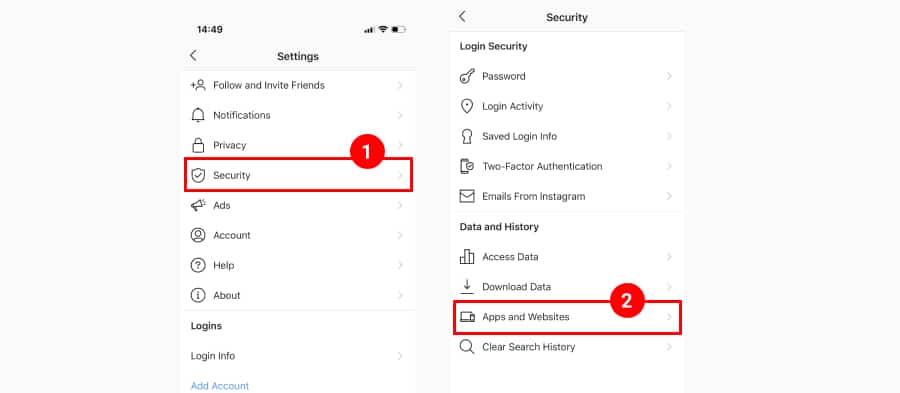
The logic behind the new update is that there is no reason to allow some applications that you used many years ago to continue to access information like your Instagram username, all your photos, captions, timestamps, permalinks, etc. This can notably apply to you if you try to maintain a private Instagram account.
All of the above makes the new Instagram feature crucial for security purposes. It will help you improve the protection of your personal data with just a single click.
Although Google, Twitter, and Facebook implemented this functionality a long time ago, it is better late than never.
How do the new Instagram API changes affect users of Instagram plugins and widgets?
Due to the API changes, most of the third-party solutions that provide integrations with Instagram based on Personal account permissions will need to re-submit their platforms.
This means they will need to get permission from Instagram to implement the new Basic API and then edit their functionalities according to the API requirements.
As a result, most of the unsupported and not-maintained apps or plugins will stop working on the 29th of June, 2020.
With the new Basic Instagram API, some of the features will not be available for personal accounts, such as:
- Number of likes and comments for the Instagram posts
- Number of followers
- The post comments
- User photo and bio text
These features will be available in the Instagram Graph API that most of the 3rd party platforms will need to get special access to in order to provide more Instagram feed functionalities.
Which platforms provide the new Instagram API changes?
The good news is that platforms with high credibility and professional teams working with the Instagram and Facebook APIs are already familiar with this situation and most of them have already switched to the new API.
So, if your Instagram feed app stops working and you need an alternative Instagram plugin, you can consider trying EmbedSocial’s solution, as the platform already supports the new Instagram API.
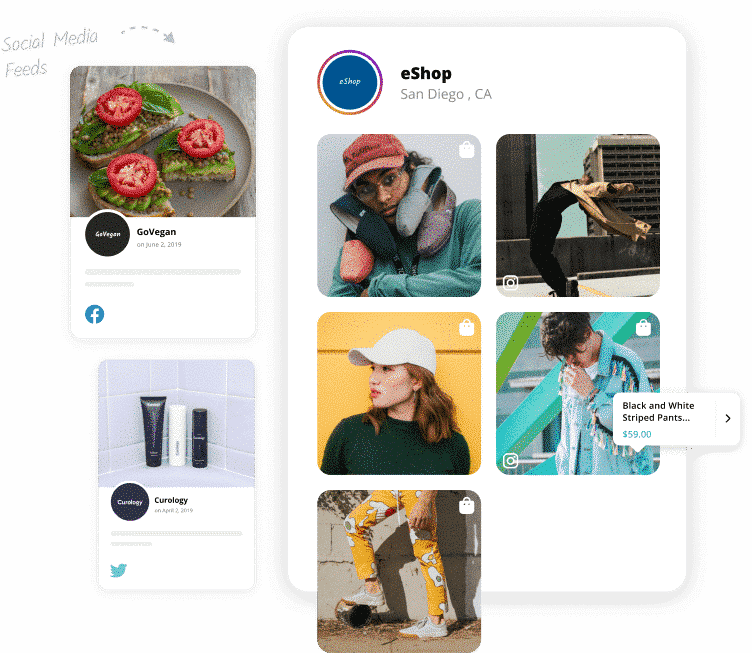
And if you are a current user of EmbedSocial, please check the instructions below on how to reconnect your Personal account in just a few simple steps.
The EmbedSocial platform has already implemented the new Instagram API. This means that users with Personal Instagram accounts can continue using it to generate and display their Instagram feeds.
Nikola Bojkov, CEO of EmbedSocial
EmbedSocial is ready to meet the needs of personal and also business accounts on Instagram. Depending on your type of Instagram account, check the details below to see which product will best suit you and which features of the API are included:
For personal accounts use the EmbedSocial social photos platform
The EmbedSocial product is aimed at personal Instagram accounts and covers the following use cases:
- Generate personal Instagram photos and save them on one platform
- Create Instagram albums with slider, grid, or masonry layouts
- Embed Instagram albums on any website
- Have an option to make the web albums auto-sync each time you post a photo on Instagram
- Provide web visitors with fresh and unique content that you regularly publish on Instagram.
The latest Instagram updates in the API are providing EmbedSocial to continue to offer these options and will only require the existing users with Personal accounts to just reconnect their profiles.
So, If you are a new user, you can go ahead and sign up for EmbedSocial and you will automatically get the new API updates without the need to do any re-connection described below.
And for all existing users of EmbedSocial, a reconnecting of the Instagram account is required in order to continue displaying the posts.
Here is how to reconnect your Instagram Personal Account in EmbedSocial
- Log in to EmbedSocial
- Go to ‘Instagram Albums’ and open one of your albums
- On the top, click the ‘Re-connect @youraccount Account’ button
- Log in to Instagram with the account displaying that album
- Provide the required permissions by clicking Continue in the Instagram permissions dialog
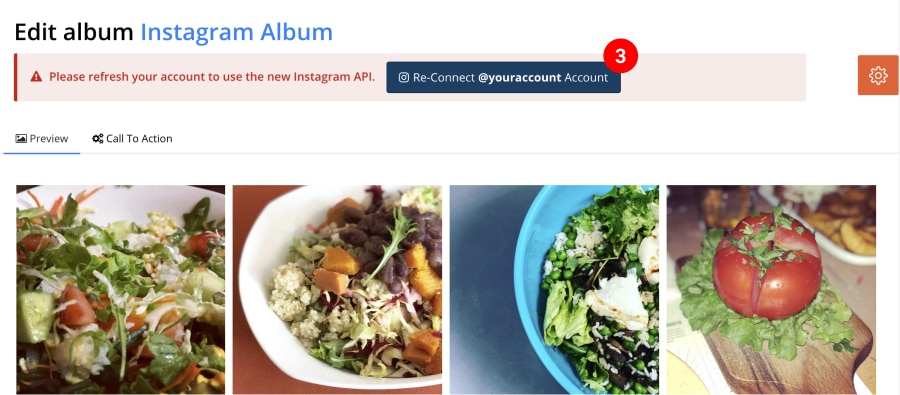
For more details, follow the screenshots walkthrough in the video below:
Please note: You will need to repeat the steps of reconnecting for each feed that you’ve created but it’s generated from different personal accounts.
For Business accounts use the EmbedSocial Instagram aggregator
Most of the features like avatars and comments/likes counts are available through the Instagram Graph API, which is implemented in the EmbedSocial product and is aimed at Business accounts.
If you need these features, then we suggest you switch from a Personal account to a Business account and start using the EmbedSocial product.
In case you need any additional help on how to reconnect your personal accounts or switch, feel free to contact us.
We will be more than happy to help you get the most value from EmbedSocial!
Conclusion
To summarise.
Instagram is launching a new change in the API and plugins that do not reflect the new changes in the API will stop working.
The good news is that professional platforms such as EmbedSocial already implemented the new API and users can continue displaying their Instagram feeds by simply allowing the required permissions via simple re-connection to their Instagram accounts.
Users who need more data via the API will need to switch to Business accounts and use professional Instagram feed plugins such as EmbedSocial in order to get all the features provided by the Instagram Graph API.
To try EmbedSocial, feel free to sign up for a free trial today.


![11 Best Social Media Widgets for Websites [+Top Use Cases]](https://embedsocial.com/wp-content/uploads/2023/03/Social-Media-Carousel-widget-template.webp)
![How to Embed Testimonials on Website in 2026 [2 Methods + Tips]](https://embedsocial.com/wp-content/uploads/2022/11/testimonials-dark-single-slider.jpg)
![How to Embed Video Gallery on Websites [+ 5 Widget Templates]](https://embedsocial.com/wp-content/uploads/2026/02/video-gallery-widgets.jpg)